

Agents that rely on one big prompt feel fast in a demo. In production, they blur brand rules, hide failures, and leave no place to review the work.
Where prompt-driven agents break
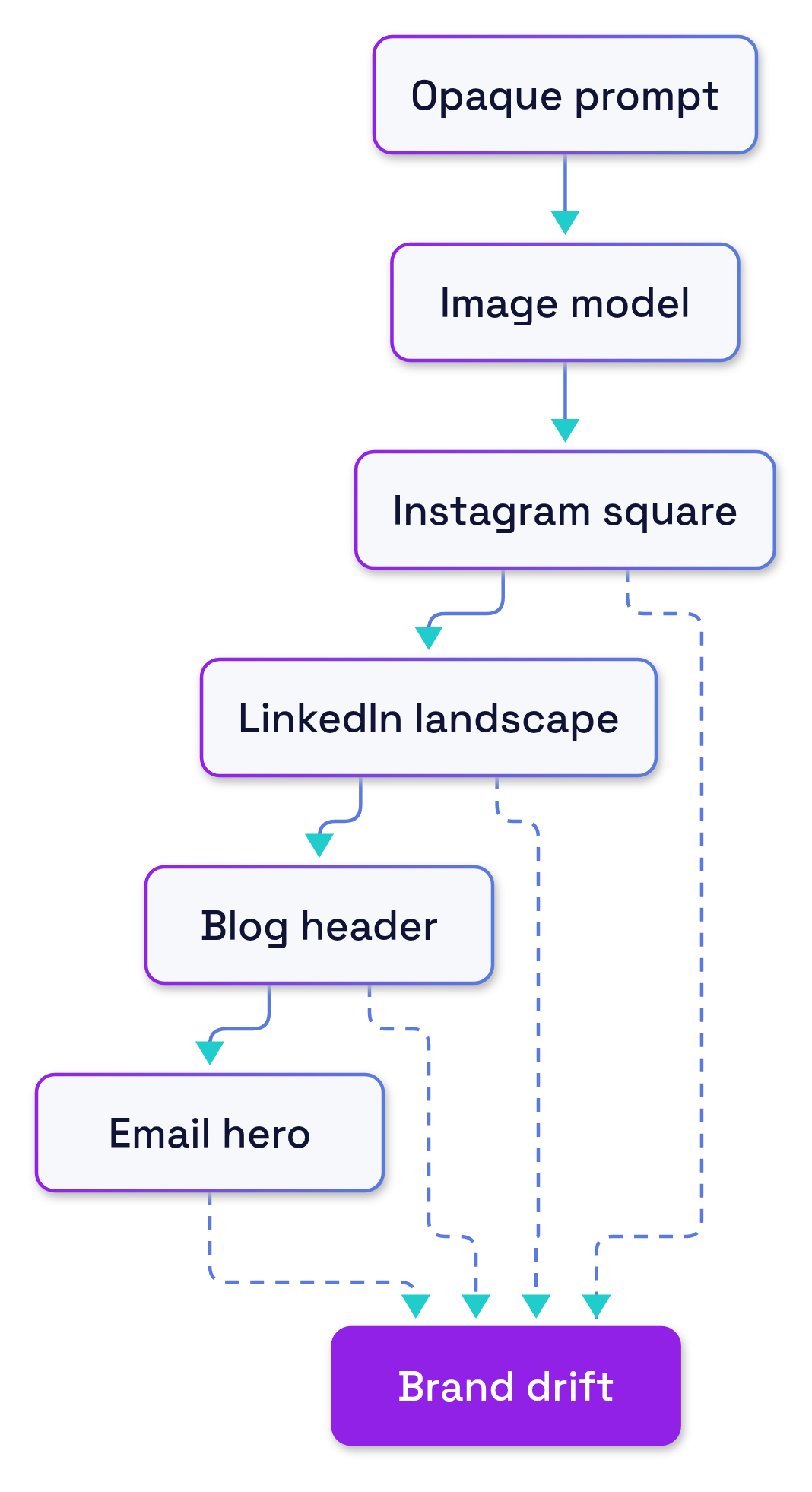
A single, clever prompt can produce great images. It can also produce small, compounding deviations when you scale across channels and deadlines. There is no defined place to inject validation or human review. Re-running the same job changes everything at once, so QA turns into guesswork.
In our case, a marketing agent was asked to create campaign illustrations for multiple channels from one prompt and an image model: Instagram square, LinkedIn landscape, blog header, and an email hero. The output often looked good, but brand elements drifted: off-palette tints, text in unsafe areas, and missing legal lines on one channel but not another. When something failed, we had one question with no stable answer: “Why did the model do that?”
The decision
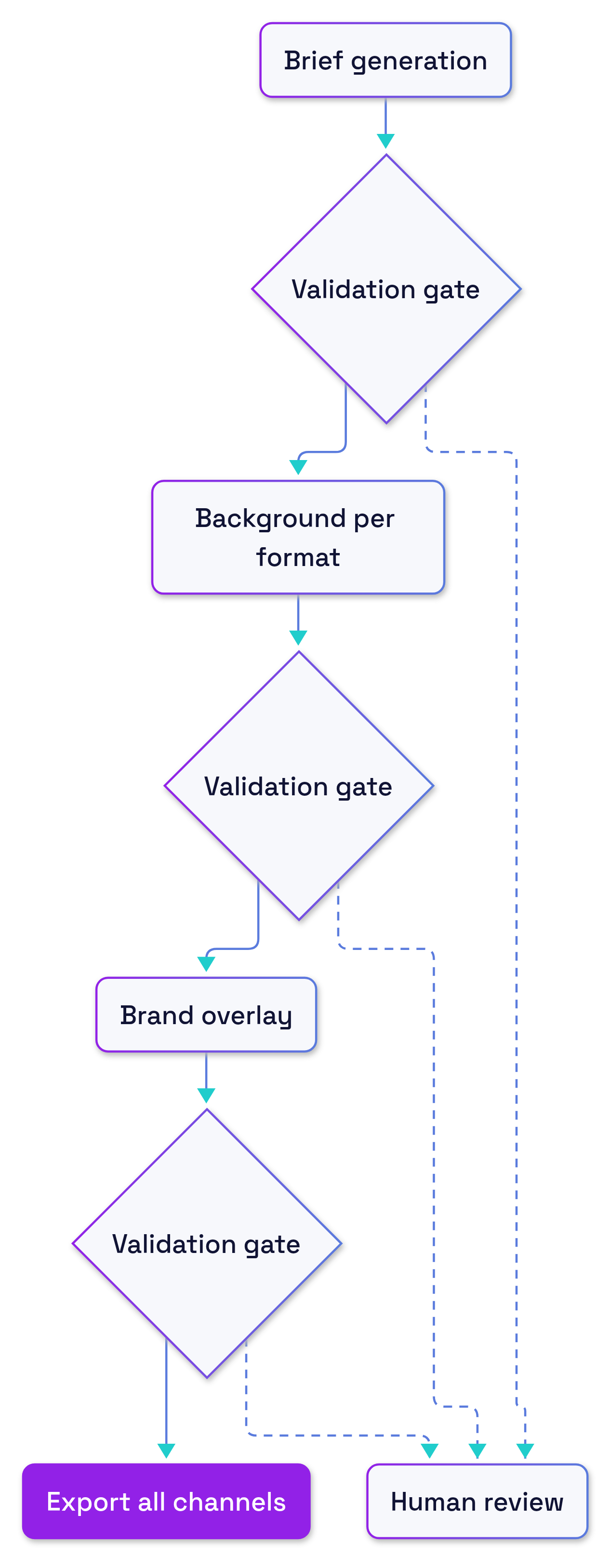
We stopped treating the agent as one opaque generation step. We split the job into a stateful workflow with explicit inputs and outputs. We used a durable orchestrator (Temporal) so each step could be validated, retried, logged, and audited on its own. Generation stayed in the loop; orchestration gave it rails.
The states were simple:
- Brief generation
- Background generation per format
- Brand-layer overlay
- Export to all channels
Between every state, we added a checkpoint with validations and optional human review.
What changed in production
- Controllability: Each state had a contract. We could clamp inputs, set seeds, and bound variability where it mattered.
- Brand compliance: Checks for palette, safe areas, logo placement, and disclaimer presence ran before moving forward.
- Reproducibility: We recorded artifacts and parameters per state. Re-runs touched only the failed step, not the whole job.
- Debuggability: We asked “which state failed?” instead of “why did the model do that?” and fixed the right thing faster.
- Human-in-the-loop: Review tasks surfaced at defined points with thumbnails and context, not buried in a chat log.
- Auditability: Temporal’s execution history gave us a durable internal audit trail for post‑mortems.
Talk to it, not to code
The point is not teaching engineers a new API. It is letting non-technical owners describe the workflow the way they would brief a new hire, then iterating by conversation.
Here is close to what our marketing lead told the agent:
- “Create a workflow called Campaign Illustrations. Channels: Instagram square, LinkedIn landscape, blog header, email hero.”
- “Step 1: Turn the campaign prompt into a visual brief with 3 concepts. Keep our tone: minimal, high-contrast, no stock faces.”
- “Step 2: For each channel, generate just the background. Lock palette to our primary and neutral colors. Save the seed and parameters.”
- “Step 3: Overlay the brand layer: logo in approved zone, headline top-left for landscape, centered for square, and add the email disclaimer in 9pt minimum.”
- “Between steps, run checks: reject tiny logo, off-palette hues, or text in unsafe areas. If any check fails twice, send for review.”
- “When approved, export final assets to the DAM and schedule posts.”
And how we corrected it the next day, without editing code:
- “Add a new rule: if a face is detected in the background, require human review.”
- “Tighten contrast check for email hero to WCAG AA.”
- “When Instagram fails color validation, retry once with a monochrome variation before escalating.”
Behind the scenes, we compiled those instructions into a stateful workflow that runs on Temporal. The owner never touched a script.
Why this matters beyond images
The same failure pattern appears anywhere a single LLM call hides multiple implicit decisions. The practical fix is the same: make the steps explicit and put checks where judgment belongs.
A minimal template looks like this:
- Gather inputs (facts, assets, constraints)
- Generate a draft (keep the model’s flexibility here)
- Validate rules and policies (automated checks first)
- Apply presentation or brand layers
- Human review at defined risk points
- Export and notify downstream systems
Three questions tell you whether to move from a prompt to a workflow:
- Does small variability create outsized risk (legal, brand, financial) in some outputs but not others?
- Do you need to retry or roll back just one part of the job without touching the rest?
- Would a named checkpoint make it obvious where a human should decide, approve, or reject?
Anywhere you answer yes, splitting one big LLM call into smaller, controllable steps makes the boundary between automation and judgment obvious.
Trade-offs and limits
There is overhead. Orchestration adds moving parts, tail latency can increase, and too many constraints can sand off useful creativity. Some experiments still deserve a single prompt. But once brand, compliance, or accountability enters the picture, treating workflows as infrastructure pays for itself.
Where do you draw human checkpoints in your agent stack, and what would you make explicit if you split your biggest prompt into steps?